
User guide
Background
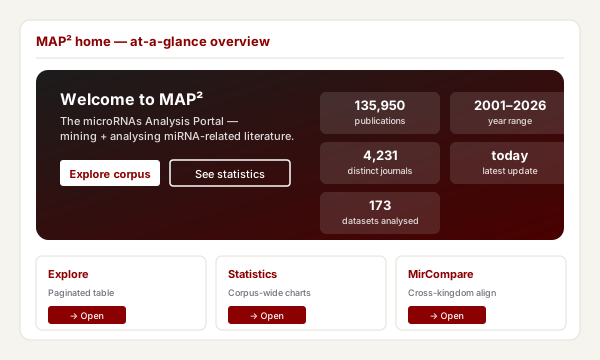
MAP², the microRNAs Analysis Portal, is a powerful resource to build and explore meaningful biological queries around microRNA-related literature. MAP² relies on SMAC, an automated data selection and retrieval system implemented by our group. Gene Expression Omnibus (GEO) identifiers are used to establish computational links between literature and any associated data: when data is available in the public domain, the system downloads the underlying expression matrices and feeds an analytical pipeline (PCA, functional enrichment, sample × sample and gene × gene correlation, breast-cancer specific profiling).
Once you access the Explore tab you can query the full microRNA-related corpus with ease: literature features (year, journal), medical terms (MeSH), free-text search and the list of analyses available for each linked dataset are all filterable. Selecting a publication that has GEO data attached opens the Dataset page, where the pre-computed analyses can be inspected and live analyses can be run on a user-selected subset of samples.
Exploring the literature
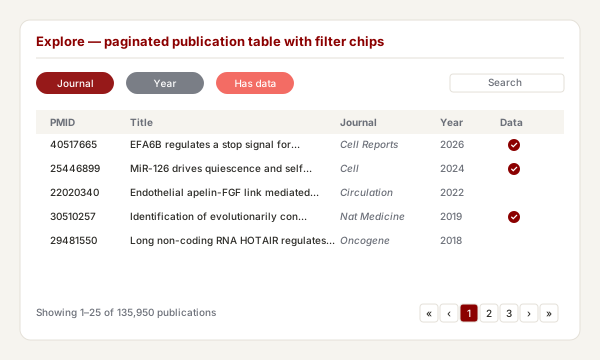
The Explore tab presents an interactive table of all the microRNA-related publications curated by SMAC. Each row shows the PMID (linked to PubMed), title and authors, journal, year, impact factor and the SMAC composite score. When a paper has one or more linked GEO datasets the row carries a data · GSE… ↗ badge and a list of the pre-computed analyses available for that dataset.
Filters can be applied in any combination (they combine with AND; multiple values in the same dropdown combine with OR):
- Search — matches PMID, title, abstract, author or keyword fields.
- Year — bound the publication date with the From / To inputs.
- Journal, MeSH terms, Keywords — typed live searches over the unique values present in the current corpus.
- Analysis available — restrict to papers whose linked dataset has at least one of PCA, Correlation, Enrichment or Breast cancer.
- Only papers with linked GEO data — quick toggle to drop bibliography-only entries.
The dropdown counts next to each value reflect the filters you have already applied elsewhere: pick a journal and the MeSH / keyword / analysis dropdowns immediately update to show how many options remain in that subset.
Access dataset details
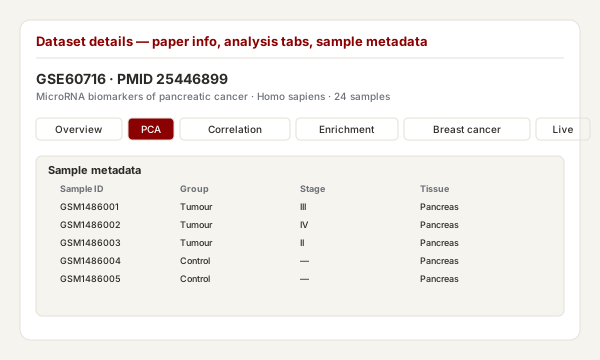
An interactive table containing the metadata of the samples that compose the dataset is presented at the top of the Dataset page. Columns can be hidden by clicking their header; rows can be individually ticked, selected in bulk (Select all), inverted or cleared. The selection drives the Live analysis tabs further down the page: any sample subset you build here is what PCA, heatmap, correlation and gene-network run against.
Principal Component Analysis
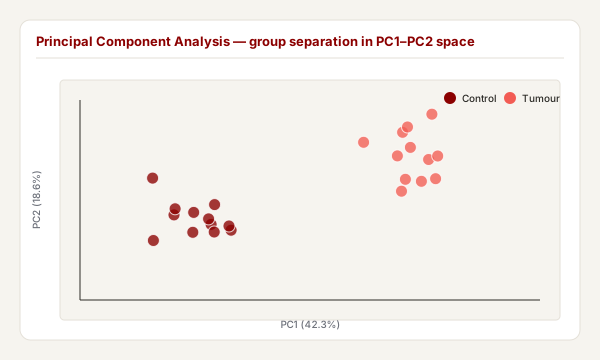
Principal component analysis (PCA) reduces the dimensionality of data while retaining most of the variation in the dataset, making it possible to visually assess similarities and differences between samples and determine whether samples can be grouped. This exploratory analysis makes it easier to identify the key factors that could be affecting the variability within expression data.
For each dataset the Pre-computed PCA tab presents an interactive 2D / 3D scatter plot of the first principal components, with samples coloured by an automatically inferred grouping variable; a barplot underneath shows the fraction of total variance attributed to each PC (the scree plot). The same PCA can be re-run on a user-selected subset via the Live analysis · PCA sub-tab — useful for interrogating a specific contrast inside a larger study.
Expression profiles
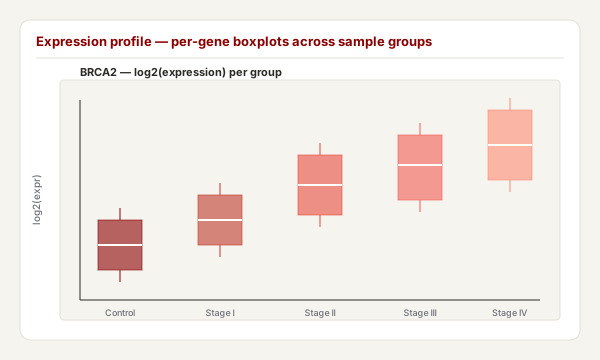
The Gene boxplot live-analysis tab allows tracking the changes of a single gene of interest across the biological conditions present in the selected samples. Expression values are shown both as quartile boxplots (one box per group) and as per-sample bars, so the granularity of differences between individual samples is preserved alongside the summary view.
The Heatmap tab presents the z-scored expression levels of the most-variable genes (top N, default 50) across all samples in the selection, with rows and columns clustered hierarchically. This is the closest equivalent to the Differentially expressed view of the legacy MAP.
Gene interaction network
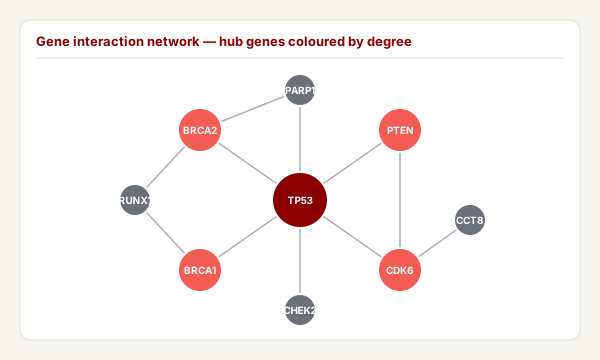
For each subset of samples defined in the Samples tab, the
interactions between user-chosen seed genes and their primary
neighbours are displayed in an interactive network. Nodes
represent the genes and are coloured according to their mean
expression z-score across the selected samples; edges represent
the interactions reported in the bundled
interactions.tsv database, a SIGNOR / mentha-derived
collection that ships with MAP² and is refreshed at every
updater run.
- Arrows — → activation, ⊣ inhibition, dashed lines for binding / unknown effect.
- Edge width — confidence score reported by the source database.
- Node size — degree (number of incident edges in the seed neighbourhood).
- Effect filter — chips on top of the canvas let you remove activation / inhibition / binding / unknown edges.
- Click a node to see its mean expression and z-score across the selected samples; click an edge to inspect the supporting PMIDs (linked to PubMed).
Correlation among genes
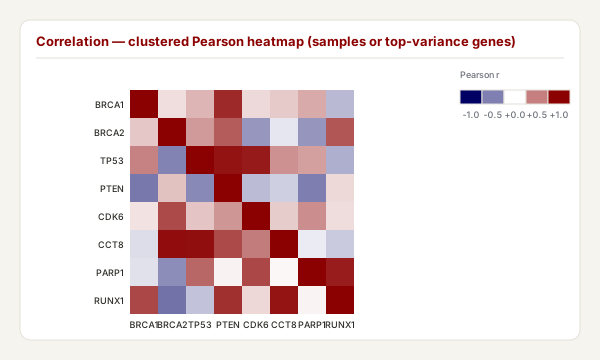
This module performs pairwise comparisons of expression levels between user-defined genes (between 2 and 50) in the same dataset. For each comparison Pearson, Spearman or Kendall coefficients are calculated; results are presented as an interactive heatmap. The colour of each cell indicates the correlation coefficient between the genes on the x and y axes, with the colour key on the right (red = positive, blue = negative).
A Pre-computed correlation tab is also available for every dataset that completed step 4c of the pipeline: it shows either the sample × sample or the gene × gene matrix at full resolution, with one click to switch between the two.
Functional enrichment
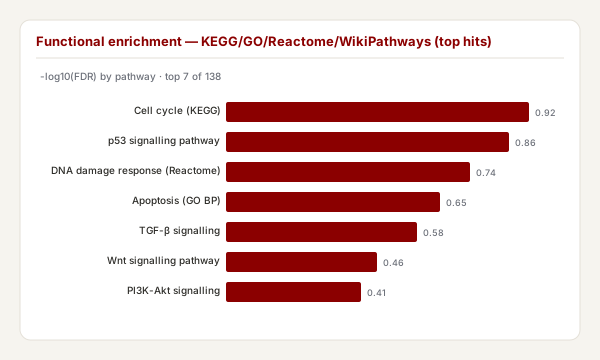
Where the SMAC pipeline detected a meaningful set of input genes for a dataset, MAP² exposes a Pre-computed enrichment tab. For each enrichment library (GO biological process, KEGG, WikiPathways) MAP² embeds the interactive gseapy-rendered plot and offers a CSV download of the underlying table. The input gene list itself is shown alongside, with a download button.
This module replaces the dot-plot / upset / heatplot triplet that the legacy MAP attached to MirCompare runs. In MAP² the enrichment is computed once per dataset, at pipeline time, so it is available for browsing without launching a job.
Breast-cancer profile (receptor status & tumour purity)
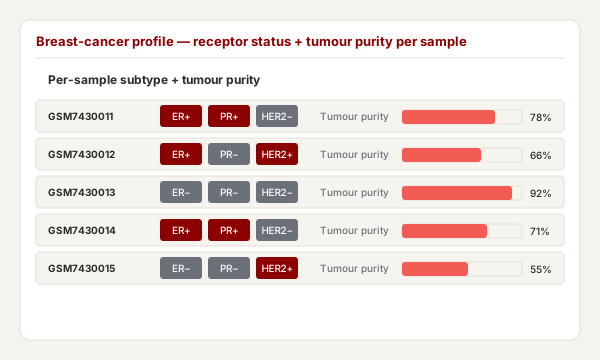
When the SMAC pipeline identifies at least one breast-cancer sample in a dataset, it computes two complementary readouts and surfaces them in the Pre-computed breast cancer tab on the dataset page:
-
Receptor status (ER / PR / HER2) — the
expression z-score of
ESR1,PGR,ERBB2against the cohort mean is computed for every breast-cancer sample; samples with z ≥ 1 are flagged as positive. The stacked bar chart shows the positive / negative / unknown counts per receptor. - Tumour purity (proxy) — a simplified ESTIMATE-style score is computed from the cohort z-scores of an immune + stromal gene signature (15 + 12 genes respectively). The histogram shows the distribution of purity scores across the breast-cancer samples, with a per-sample rug strip for hover-to-identify.
Both panels are now fully interactive — earlier static PNGs are
still available as a download alongside the underlying CSVs
(receptor_status.csv, tumour_purity.csv).
Corpus-wide statistics
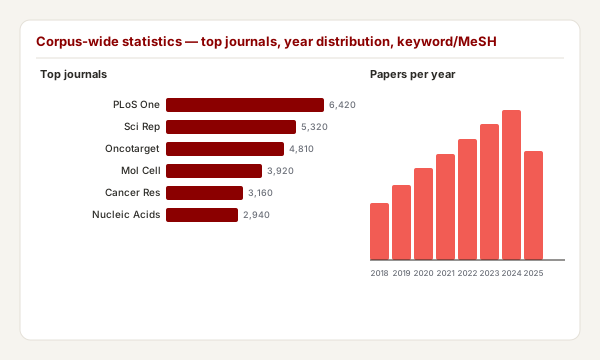
The Statistics tab presents an aggregated view of the curated literature: top MeSH terms, top keywords, top journals, publications-per-year time series and a barchart of how many datasets carry each precomputed analysis. The counts are computed live from the same DuckDB views that drive the Explore page, so a re-run of the updater is reflected on the next page load.
MirCompare
Background
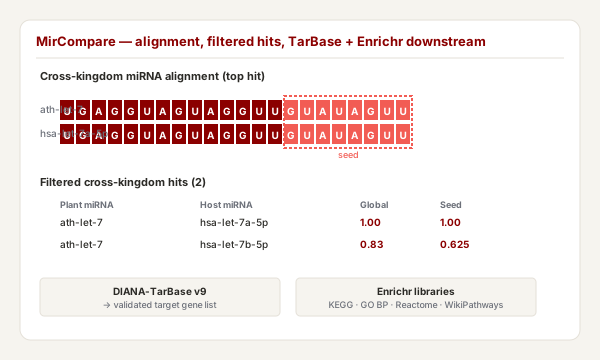
MirCompare compares libraries of miRNAs belonging to organisms from the plant and animal kingdoms, to find cross-kingdom functional homologies. MAP² ships with a faithful re-implementation of the original two-tier alignment scheme, improved with respect to speed and quality of predictions while respecting the concept of functional homology coined by our previous studies. Analyses are submitted to a background worker (default 2 concurrent jobs) and the user is notified by email when the run is complete; the per-job UUID is the access token for its results.
A renovated strategy of alignment
The methodology of alignment uses a scoring system that takes
into consideration the presence of open and extended gaps in the
global (whole sequence) and local (seed-specific) alignments.
Following the previous version, the global alignment
assigns +1 in case of match and 0 otherwise, normalised by
alignment length. The seed-specific alignment
(last 8 nt) is much more stringent: −0.5 for mismatch, −1 for
open gap, −1 for extended gap. Filtering is applied as
global ≥ G AND seed ≥ S AND both p < 0.05.
Assessing the statistical significance
For every comparison the system assesses whether the magnitude of the alignment is far from randomness. Given two sequences A (plant) and B (mammalian), MirCompare determines the nucleotide composition of B and generates N scrambled sequences B' (default 50). A series of SA,B' alignment scores is calculated and a one-sample t-test is performed on the observed score against the scrambled distribution. The procedure is applied independently to the global and seed alignments, yielding two p-values per comparison.
Submitting a job
The submission form on the MirCompare page accepts
plant and host miRNA libraries either as a FASTA paste or as a file
upload (.fa / .fasta / .txt). The user can tune the global and
seed thresholds, the number of scrambles per pair (more scrambles
= tighter p-values but longer runtime) and supply an email address
to receive the completion notice with a link to the results page.
The results page lists job state, file downloads (the input FASTAs,
comparison.full.tsv, comparison.filtered.tsv,
summary.json) and a paginated preview of the comparison
tables.
COMPASS
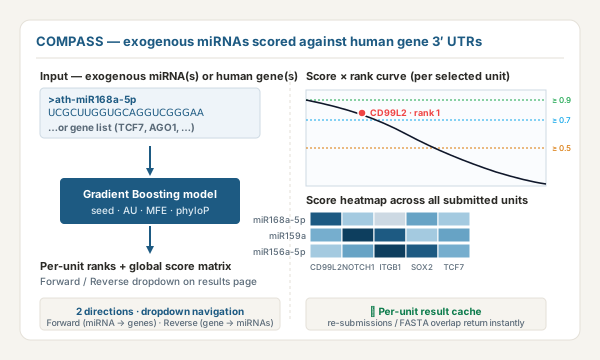
COMPASS (the COMPASS tab in the main menu) is a sequence-based machine-learning classifier that scores exogenous miRNA → human gene pairs for likely targeting. Where MirCompare answers "does this exogenous miRNA look like a known host miRNA?", COMPASS answers the harder question "which human genes is this exogenous miRNA likely to target?". The bundled source-species reference pools (ath, osa, zma, gma) are convenient defaults for cross-kingdom work; a custom FASTA upload lets you point COMPASS at any other source.
The model was trained on experimentally-validated human miRNA-target interactions from miRTarBase using three feature families:
- Seed-site features — TargetScan-style matches between the miRNA's seed region and the gene's 3′ UTR (6-mer, 7-mer-m8, 7-mer-A1, 8-mer).
- Duplex thermodynamics — minimum free energy of the miRNA-UTR duplex computed with ViennaRNA.
- Conservation — phyloP scores over the predicted binding sites, capturing how evolutionarily constrained the candidate region is.
Two analysis directions are offered:
- Forward — submit one or more exogenous miRNA sequences (as bare text or FASTA-style); each is scored against every human gene with a curated 3′ UTR and ranked. The results page has a miRNA-of-interest dropdown that switches the per-miRNA rank curve, top-N bars and detail table; a global score heatmap shows every submitted miRNA × the union of their top hits at once.
- Reverse — submit one or more human gene symbols; each is scored against the full exogenous miRNA pool (Arabidopsis by default; switch to osa, zma, gma, all, or upload a custom FASTA). A gene-of-interest dropdown on the results page navigates between genes, with the same global heatmap across every submitted gene.
A typical single-sequence run in fast mode finishes in ~10 seconds; the full all-genes forward scan takes 10–30 minutes, so leave an email address on the form to be notified when results land. Per-unit caching (keyed on the canonical input) means re-submitting the same miRNA or gene — or even a FASTA that overlaps a previous one — returns instantly. Submitted analyses follow the same 30-day retention policy as MirCompare jobs.
What changes compared with the legacy MAP
MAP² is a complete rebuild of the original MAP. All the biological analyses you knew are still here, with several improvements you'll notice as you use the site:
More — and more accurate — data per paper
- GEO and ArrayExpress. For every microRNA paper in the corpus, MAP² now looks for associated gene-expression data in both NCBI GEO and EBI ArrayExpress. ArrayExpress studies appear on the site exactly like GEO ones, so the same analysis tabs (PCA, correlation, enrichment, breast-cancer profile) work on either source.
- Trustworthy paper-to-data links. A dataset is shown next to a paper only when that paper is recorded as the dataset's primary publication. The legacy version often tagged review articles with dozens of unrelated datasets because the underlying NCBI link includes anything that cites the dataset; MAP² verifies the relationship against the dataset's own curated metadata.
- Focus on primary research. Papers that come back linked to more than three datasets are filtered out — that pattern almost always indicates a review or meta-analysis re-using other authors' data. The Explore page therefore mostly shows datasets you can attribute to the listed paper.
- Off-topic papers removed. Occasional PubMed quirks (e.g. a 1972 book chapter on a peptide modification with no microRNA relevance) are auto-excluded so the corpus only contains papers that are genuinely about microRNAs.
Cleaner search and statistics
- Live, context-aware filters. On the Explore page, ticking a journal, year or MeSH term immediately narrows the values shown in the other dropdowns, so you can always see how much corpus remains under your current selection.
- No background noise in the dropdowns. Generic terms — microRNA, miRNA, Humans, Animals, Female, Male, Mice, Adult and similar demographic boilerplate — are stripped from both the keyword and MeSH lists. Only terms that actually discriminate between papers reach the filters and the stats charts.
- Grouped variants in the stats. Variants like biomarker / biomarkers / Biomarker / Biomarkers are folded into a single concept, so each one appears once in the top-N charts with the correct total (instead of four near-duplicate rows splitting the count).
- Dedicated statistics page. Top journals, top keywords, top MeSH terms, year distribution and dataset counts by analysis type, all in one view. The homepage's single "datasets analysed" tile counts only datasets that actually have at least one pre-computed analysis attached.
Per-dataset analyses
- Interactive breast-cancer profile. Receptor status (ER, PR, HER2) and tumour purity are now zoomable, hoverable charts rather than static images. The receptor calls also read the relevant genes (ESR1, PGR, ERBB2) directly, fixing the cohorts that used to come back as "all samples unknown" because the legacy method couldn't separate them cleanly.
-
Gene names instead of probe IDs. Affymetrix
Gene/Exon ST arrays used to land on MAP with opaque numeric
probe IDs (e.g.
7896738). MAP² translates these to standard gene symbols (e.g. PTEN), so the gene search and receptor-status features now work end-to-end on cohorts that used to be unsearchable. - Robust analyses on real-world data. Principal Component Analysis and gene-gene correlation now handle the scattered missing values that are common in GEO matrices — previously, datasets where no single row was fully observed produced empty plots.
- Richer MirCompare results. When a plant miRNA crosses the filter against a human host miRNA, MAP² now automatically retrieves the host miRNA's experimentally-validated target genes (DIANA-TarBase) and runs functional enrichment (KEGG, GO Biological Process, Reactome, WikiPathways) without leaving the results page. Target lists and enrichment tables download in one click.
Day-to-day use
- Works on phones and tablets. The navigation collapses to a menu icon, the hero re-stacks vertically, and the Explore table stays readable on smaller screens.
- Always up to date. MAP² fetches new papers and refreshes analyses every night automatically. The gene-interaction network is also rebuilt from the latest mentha and SIGNOR databases on every run. You don't need to do anything to see the latest content.
- 30-day retention for submitted work. Analyses you submit on the MirCompare page are kept for 30 days, after which they're automatically removed. Please download any results you wish to keep before then.
-
Same URL as before. MAP² lives at the same
/MAPaddress as the legacy site — old bookmarks continue to work.
Two features of the legacy MAP are intentionally not carried over:
- PAM50 molecular classification. The legacy MAP included a single-sample PAM50 predictor for breast-cancer subtyping (Luminal A / Luminal B / Basal-like / HER2-enriched / Normal-like). MAP²'s breast-cancer panel reports the three receptor calls and tumour purity, but not the five-class molecular subtype.
- Sequence-based target predictions in MirCompare. The legacy ran computational target predictions (ComiR / miRanda-style scoring) and laid them out as dot-plots, UpSet plots and heatmaps on the results page. MAP² uses experimentally-validated targets from DIANA-TarBase instead — fewer false positives, but it doesn't speculate about novel targets purely from sequence matching.